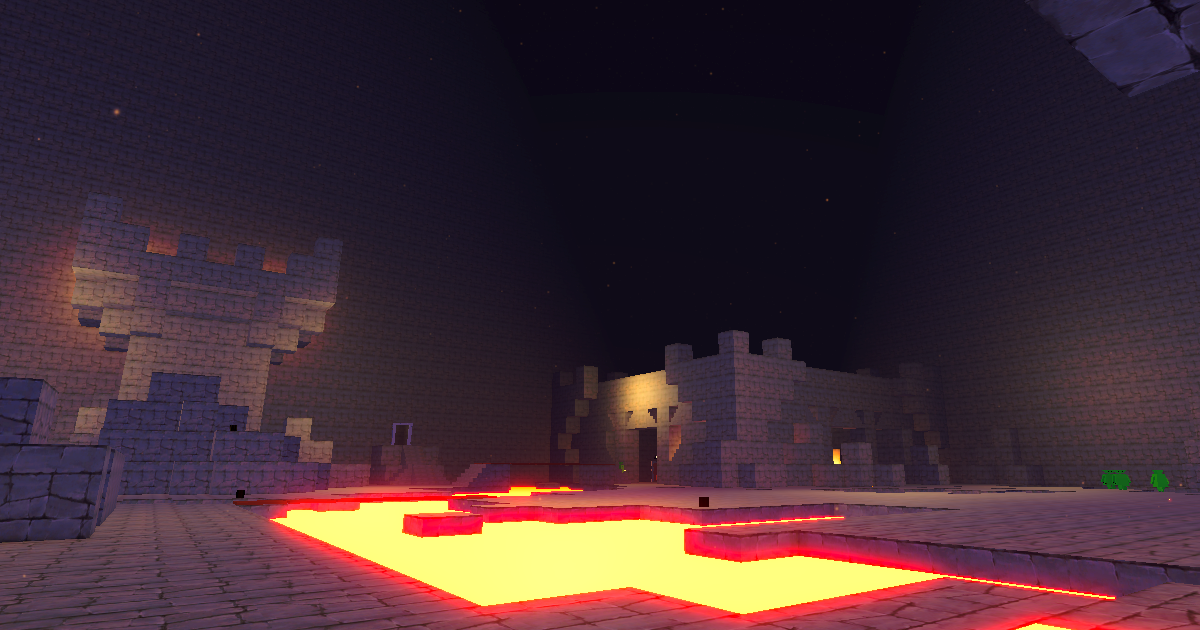
Dungeon Builder Game (Name TBD)
Build dungeons, run dungeons, and risk everything you find. A multiplayer roguelike dungeon crawler where every room is player-created and every piece of loot is a decision.
The core of the game is a simple but difficult choice: push deeper into the dungeon for better loot, or extract now and keep what you've found. Gear you extract goes back to your personal lobby - a customizable home space where you display your trophies, store your best weapons, and prepare for the next run. But another choice emerges: do you risk bringing your hard earned trophies back into the dungeon for a stronger start and a chance at even greater rewards? Extraordinary prizes await, but at the cost of losing everything you take with you.
Rooms scale in difficulty as you descend, with enemy types, gear, and encounters tuned to match. No two runs feel the same thanks to a pool of community-built rooms and a difficulty system that adapts to how deep you dare to go.
Build rooms with a powerful in-game editor that puts full creative control in your hands. Place terrain, enemies, traps, and obstacles on a 3D grid with intuitive controls to craft exactly the challenge you envision. Wire together reactive elements like pressure plates that trigger enemy waves, timed doors that lock players in until they survive, and patrol paths that send enemies marching through corridors. And finally publish your creation to unleash it on the world. The builder is designed to be approachable for anyone, but deep enough to create rooms that surprise even experienced players.
Steam Demo Coming Soon
Daily Game Updates
Patrol Paths & Y Clip Everywhere
Built out the full patrol path visualization system and made y clipping available in all editor modes.
Patrol Paths & Y Clip Everywhere
Built out the full patrol path visualization system and made y clipping available in all editor modes.
What got done
- Built nav-aware patrol path visualization so patrol lines actually follow the navigation graph instead of drawing straight lines through walls
- Added a dashed patrol shader with per-segment length so paths look distinct and readable at any zoom
- Patrol lines now preview during waypoint placement with per-segment alpha, giving immediate feedback while you’re building a route
- Added collision prevention so you can’t accidentally place a waypoint on top of another one from the same path (loops are still allowed)
- Split segments hide properly now and path visibility refreshes when toggling views
- Patrol nav path materials got an update for better readability
- Y clip was pulled out of placement-only mode and made available across all editor modes — huge quality of life win
- Escape key chain was reordered to feel more natural when backing out of nested states
- Waypoint placement and interactions now work correctly with y clip active
Technical notes
Big patrol path day. The nav-aware visualization was the main piece — instead of dumb straight lines between waypoints, the paths now trace the actual navigation graph edges so you can see exactly where an enemy will walk. The dashed shader gives each segment its own length value which looks much cleaner than a uniform dash pattern. Moving y clip out of placement mode was a small change with outsized impact since you no longer have to switch modes just to see a specific floor level.
Lava Flow System & Admin Bypasses
Implemented a lava flow simulation with procedural shader and added admin bypass points for the publisher.
Lava Flow System & Admin Bypasses
Implemented a lava flow simulation with procedural shader and added admin bypass points for the publisher.
What got done
- Built a lava flow simulation system that’s aware of room bounds so lava doesn’t leak into the void
- Added a debug renderer API for the lava system and hooked it up at runtime so you can visualize flow behavior
- Created a procedural lava shader with a shared material — no textures needed, it’s all math
- Implemented difficulty calculation improvements for more accurate room ratings
- Added system bypass points for admin editing in the publisher
- Updated the publisher with an additional bypass for edge cases
- Started a plan doc for the full lava implementation roadmap
Technical notes
The lava system was the big push today. The flow simulation runs on the grid and respects room boundaries, which sounds simple but required some careful bounds checking. The procedural shader turned out nice — it’s entirely math-driven with scrolling noise layers so there’s no texture memory cost. The admin bypass stuff was a late-night addition to make it easier to edit and republish rooms without hitting the normal validation gates.
Builder Polish & Free Item Overhaul
Massive day of builder cleanup covering free item handling, delete previews, move operations, and a full legacy bridge removal.
Builder Polish & Free Item Overhaul
Massive day of builder cleanup covering free item handling, delete previews, move operations, and a full legacy bridge removal.
What got done
- Removed the entire legacy bridge/group system — it was dead code cluttering things up
- Migrated free-item rotation to use YawDegrees instead of the old rotation index system
- Built a proper move flow for free items: original object gets removed on move start, cancel restores it, and undo aborts cleanly
- Fixed highlighting and selection issues that cropped up after the move changes
- Swapped free item selection to use the material swapper approach (same as the delete pipeline) for consistency
- Moved free-item delete preview to material swap instead of the old overlay method
- Unified free-delete preview to respect height-lock settings
- Added rejection for free placement into already-occupied grid cells
- Unified pointer targeting across controllers and refactored the shared targeting code
- Fixed an issue where free placement was catching delete clicks meant for grid items
- Added DragVolumeBox for delete preview visualization
- Resolved height lock and y clip level alignment issues
- Applied delete material to free-item renderers properly
- Added hybrid delete mode with distance-scaled camera panning
- Suspended builder input during modal dialogs so keypresses don’t leak through
- Added room rename and a way to hide settings in the builder
- Updated inspector references and script execution order
- Added TODOs for undo support across the builder
Technical notes
This was one of those grind-it-out days where you just keep fixing things until the builder feels right. The free item handling was the main thread — move, delete, selection, and placement all needed to go through the same material-swap pipeline that grid items use. Removing the legacy bridge system was cathartic. The unified pointer targeting refactor touched a lot of files but makes the codebase much more maintainable going forward.
Builder Refactor Mega-Session
Broke the monolithic builder into focused controllers across seven refactor phases, plus selection UI and free item work.
Builder Refactor Mega-Session
Broke the monolithic builder into focused controllers across seven refactor phases, plus selection UI and free item work.
What got done
- Executed a full seven-phase builder refactor, breaking the monolith into smaller, focused scripts
- Phase 1: Split out basic responsibilities from the main builder controller
- Phase 2: Extracted lifecycle management scripts
- Phase 3: Pulled drag placement into its own controller, disabled bridges
- Phase 4: Moved move/clipboard/plate logic out of selection
- Phase 5: Extracted BuilderPatrolController to handle all patrol delegation
- Phase 6: Consolidated undo and clipboard through a unified BuilderCommit system, fixed metadata loss bugs
- Phase 7: Removed legacy single-selection state and obsolete properties
- Built free-item move, placement, and associated UI fixes
- Removed old selection context menu scripts and wrote new paths
- Wired up a new context panel with adjustable container and block-based layout
- Migrated GameConfig values to compile-time constants
- Fixed free placement face detection and swapped in an invalid material indicator
- Migrated free item selection and cleaned up builder and lobby references
Technical notes
This was a late-night marathon. The builder had grown into a single massive file that was getting painful to work with, so I broke it apart systematically. Each phase was its own commit so I could verify nothing broke between steps. The record-based placement approach for clipboard and move operations is cleaner than the old proxy-based system. The compile-time GameConfig constants change is small but removes a bunch of runtime lookups.
Reactive Visuals, Selection Rework & Performance
Introduced the reactive visual system, rebuilt selection around grid cells, and fixed a 5-second lag on bulk operations.
Reactive Visuals, Selection Rework & Performance
Introduced the reactive visual system, rebuilt selection around grid cells, and fixed a 5-second lag on bulk operations.
What got done
- Created the IReactiveVisual system so pillars (and future things like bridges) automatically update when nearby grid cells change, without scanning the whole scene
- Refactored selection to be fully grid-cell based instead of relying on PlaceableProxy GameObjects
- Added a layer clip cap mesh that draws a cross-section surface at the clip plane so you can see where floors are cut
- Removed the old height lock transparency system in favor of the cleaner clip + cap approach
- Fixed y clipping material adjustment that was broken
- Built the SuppressChangeEvents system for BuilderRoomModel — bulk operations no longer fire per-cell events
- Fixed a 5-second lag on mass-place operations (25k cells) by suppressing change events during bulk ops
- Added cell-change timing instrumentation (then removed it once the fix was confirmed)
- Rendered the builder preview directly to screen and added the lava floor to preview mode
- Added BuilderNavGridController with F5 toggle for nav grid visualization in the editor
- Added in-scene room preview mode so you don’t have to spawn a separate preview anymore
Technical notes
The performance fix was the highlight. The root cause was simple but brutal: every cell change during a bulk operation triggered OnCellChanged, which cascaded into RefreshAllPillars, which called FindObjectsByType 25,000 times. The SuppressChangeEvents flag lets bulk operations skip all that and fire a single notification at the end. Went from 5 seconds to near-instant. The reactive visual system is the proper long-term fix — instead of scanning every object in the scene, it tracks reactive items by column index and only updates what’s actually affected.
Chunk Mesh System & Binary Serialization
Built the chunked mesh rendering pipeline, binary room format, and grid-based runtime build path in one massive push.
Chunk Mesh System & Binary Serialization
Built the chunked mesh rendering pipeline, binary room format, and grid-based runtime build path in one massive push.
What got done
- Created the chunked room mesh system with greedy meshing scoped to 16x16x16 chunks
- Added cell highlight renderer and terrain shaders for the chunk system
- Integrated CellMetadata store with the chunk system
- Handled terrain rendering without proxy GameObjects — pure mesh, no per-cell objects
- Swapped all raycasting from physics-based to grid-based DDA vector cast
- Set up greedy mesh toggle settings for controlling which blocks get merged
- Built visual-only GameObjects for non-meshable grid items (stairs, enemies, etc.)
- Created the DBGR binary room serializer and deserializer
- Added binary room serialization with automatic JSON migration
- Built a grid-based runtime room pipeline for playtest
- Migrated the full room pipeline to binary/grid format
- Completed the room system migration to binary format
Technical notes
This was probably the biggest single day of the chunk refactor. Going from per-cell GameObjects to chunk-based greedy meshing is a fundamental architecture change. The binary format (DBGR) uses palette compression per chunk and gzip — a 2MB JSON room file becomes about 4KB. The DDA raycast swap means we don’t need physics colliders on terrain at all anymore, which is a huge simplification. Getting the runtime playtest path working on the new grid system meant the whole pipeline is now unified from editor to play.
Builder Clipboard & Selection Polish
Added copy/paste and multi-item move with previews, plus selection quality of life improvements.
Builder Clipboard & Selection Polish
Added copy/paste and multi-item move with previews, plus selection quality of life improvements.
What got done
- Implemented clipboard-based copy/paste for the builder — select items, Ctrl+C, Ctrl+V with a preview ghost
- Built multi-item move with preview visualization so you can see where things will land before committing
- Added Shift+WASDQE to nudge the selection AABB in any direction
- Fixed patrol path references not being cleared when deleting a path
- Minor selection controller cleanup
Technical notes
The copy/paste system stores entries as cell-relative offsets from a pivot point, so pasting works regardless of where you copied from. The move preview reuses the same ghost rendering as placement mode. The AABB nudge with Shift+WASDQE is one of those small additions that makes a big difference when you’re building rooms — you can fine-tune your selection box without having to re-drag it.
Multi-Selection & Room Settings
Added multi-selection support to the builder along with room settings UI, lava floor controls, and layer clip improvements.
Multi-Selection & Room Settings
Added multi-selection support to the builder along with room settings UI, lava floor controls, and layer clip improvements.
What got done
- Added multi-selection support to the builder — Ctrl+click to add/remove, Shift+click for AABB range select
- Built a Room Settings UI panel with manual height override and lava floor toggle
- Created BuilderLavaFloor that renders in the editor and preview
- Fixed lava floor enabling at room load and made it show in room preview
- Recalculated shell geometry on cell changes and adjusted UI anchors
- Added LayerClipPerimeter wire-up into the builder
- Built layer-clip UI and logic for controlling which floors are visible
- Added waypoint stop toggle and persisted spawner data to metadata
- Added UI for various builder quality-of-life improvements
Technical notes
Multi-selection was the big feature. It uses a HashSet for deduplication and stores entries as cell coordinates rather than object references, which fits the new proxy-free architecture. The room settings panel gives level designers control over things that were previously hardcoded — manual ceiling height is especially useful for rooms that don’t need the full default height. Layer clip perimeter draws a visible boundary at the clip plane so it’s obvious where the cutoff is.
Puzzle Doors & Pressure Plates
Built the puzzle door and pressure plate system from scratch with animations, context menus, and plate assignment UI.
Puzzle Doors & Pressure Plates
Built the puzzle door and pressure plate system from scratch with animations, context menus, and plate assignment UI.
What got done
- Created the full puzzle-door and pressure-plate system — doors that open when plates are triggered
- Added door animation with open/close states and wired up prefabs
- Renamed the old trigger system to avoid confusion with the new door triggers
- Built a context menu for door and plate logic so you can assign plates to doors visually
- Integrated puzzle door controls into the existing selection context menu
- Refactored door-plate assignment and updated UI labels for clarity
Technical notes
The door system uses metadata to link pressure plates to their target doors by ID. When a plate is activated at runtime, it looks up its assigned door and triggers the animation. The context menu integration lets you click a door, see which plates are assigned, and add or remove connections. This was a clean build from the ground up — the old trigger naming was confusing so I renamed things while I was in there.
Patrol Path Editor & Waypoints
Built a full patrol path editor with waypoint placement, path editing mode, and delete support.
Patrol Path Editor & Waypoints
Built a full patrol path editor with waypoint placement, path editing mode, and delete support.
What got done
- Built the patrol path editor and waypoint system from scratch
- Added a PathEdit input mode with waypoint integration in the builder
- Created a standalone patrol mode for editing enemy patrol routes
- Updated the delete button to work generically for any selected path
- Added debug logging to the waypoint controller for easier troubleshooting
- Moved scenes to a proper folder structure and added builder UI for path editing
- Assigned references for patrol path addition
- Fixed various reference issues during integration
Technical notes
The patrol path editor lets builders define waypoint routes that enemies follow when not in combat. You enter PathEdit mode, click to place waypoints, and they chain together into a path. Each path can be selected, modified, or deleted. The waypoint system integrates with the existing enemy goal system — patrol is just another goal that walks the enemy through the waypoint list. Debug logging was added early because waypoint ordering bugs are hard to spot visually. The scene reorganization into 01-Scenes was overdue for keeping things tidy.
Particle Cleanup
Cleaned up files and started on new particle effects.
Particle Cleanup
Cleaned up files and started on new particle effects.
What got done
- Cleaned up miscellaneous files and started work on new particle effects
Technical notes
Short day. Mostly housekeeping and early work on some new particles that will get finished in a later session.
Spell VFX & Soft-Lock Visuals
Added muzzle flash VFX, a SpellVFX pool, and soft-lock debug visuals for spell targeting.
Spell VFX & Soft-Lock Visuals
Added muzzle flash VFX, a SpellVFX pool, and soft-lock debug visuals for spell targeting.
What got done
- Added muzzle flash VFX for spell casting
- Built a SpellVFX pool and config system for managing spell visual effects
- Added soft-lock debug visuals to show targeting behavior
- Updated spell assets with improved visuals
- Moved and renamed VFX files for better project organization
Technical notes
The SpellVFX pool keeps particle systems alive and recycles them instead of instantiating new ones per cast. The muzzle flash fires at the cast origin and scales with spell tier. Soft-lock debug visuals draw the targeting cone and highlight what the auto-aim is locking onto, which was really helpful for tuning the targeting feel. The file reorganization moved VFX assets into a proper folder structure since they were getting scattered across the project.
4-Axis Spell System
Built the new spell system from scratch with projectile travel, AoE tiers, roll ranges, and debug tooling.
4-Axis Spell System
Built the new spell system from scratch with projectile travel, AoE tiers, roll ranges, and debug tooling.
What got done
- Implemented the 4-axis runtime spell system (element, shape, modifier, tier)
- Removed the old spell system to start fresh
- Created spell effect assets for the new system
- Added debug loot spawning and a DebugConfig editor for faster iteration
- Added projectile spell travel with lifetime tracking
- Built AoE tiers and roll ranges for spell variety
- Added spell details to the debug overlays
- Handled SingleTarget vs AoE projectile impacts differently
- Fixed lifetime checks on aimed spell projectiles and spell cooldown bugs
- Handled spell cast timing and updated debug displays
Technical notes
The spell system uses four axes to generate variety: element determines damage type and visuals, shape controls whether it’s a projectile, cone, or AoE, modifier adds effects like piercing or bouncing, and tier scales power. Roll ranges mean enemies and loot tables can generate spells within a tier range, giving natural progression. The DebugConfig editor was a productivity win — being able to spawn specific loot and spells from an editor window instead of playing through rooms saves a ton of testing time. Had to fix a subtle bug where aimed spell projectiles weren’t checking their lifetime correctly, causing them to persist forever.
Ranged Charge & Spell Design
Refactored the ranged charge and zoom system, balanced weapons and enemies, and designed the spell system.
Ranged Charge & Spell Design
Refactored the ranged charge and zoom system, balanced weapons and enemies, and designed the spell system.
What got done
- Refactored ranged charge and zoom mechanics for better feel
- Switched to MinChargeSpeed instead of multiplier-based charge scaling
- Created new ranged weapon assets
- Set knockback values for melee weapons
- Adjusted debug flags and balanced ranged weapons and enemy stats
- Fixed the power meter showing incorrectly in playtest mode
- Wrote the SpellSystemDesign doc to plan the upcoming spell implementation
Technical notes
The ranged charge refactor replaced the old multiplier system with a MinChargeSpeed approach. Instead of scaling damage by a charge multiplier, arrows now have a minimum speed they need to reach before firing. This feels more intuitive — you hold the draw until the bow is taut, then release. The spell system design doc lays out a 4-axis system where spells have element, shape, modifier, and tier dimensions. Implementation starts next session.
Weapon System Refactor
Massive weapon system rewrite across six phases -- new melee and ranged combat, dual-slot equipping, knockback, and overhauled animations.
Weapon System Refactor
Massive weapon system rewrite across six phases -- new melee and ranged combat, dual-slot equipping, knockback, and overhauled animations.
What got done
- Completed a full weapon system refactor across six phases
- Phase 1-2: Restructured weapon data and created new melee and ranged weapon profiles
- Phase 3-4: Rebuilt the combat pipeline with new hit detection and damage application
- Phase 5-6: Wired up animations, VFX, and integrated with the inventory system
- Created melee weapon prefabs with new animations
- Separated melee sweep into horizontal and vertical modes
- Moved knockback and timing configuration into CombatProfile
- Added enemy knockback with adjustable player speeds
- Fixed angle checks on player attacks
- Added RangedAimZoom camera zoom for ranged attacks
- Refactored player attack animations with new weapon system
- Added movement slow during attacks instead of full input locking
- Persisted active equipment slot and added an ActivateSlot API
- Added drop and kinematic spawn options for pickups
- Replaced weapon muzzle with a projectileOrigin transform
- Supported forced loot spawns and a starter weapon rack
- Deferred ranged movement slow until draw is complete
- Cleaned up old asset files and goblin weapon references
Technical notes
This was a marathon session that touched almost every part of combat. The old weapon system was bolted on incrementally and had become a mess of special cases. The new system has clean data separation: CombatProfile defines timing, damage, knockback, and sweep parameters. Weapons reference a profile and provide their own prefab and animations. The horizontal vs vertical sweep split lets swords swing side to side while hammers come down from above, each with their own hit detection shapes. Knockback finally feels right — enemies react to hits with proper force and direction. The aim zoom for ranged weapons adds a nice tactical feel when lining up shots.
Debugger Config
Quick update to the debugger configuration.
Debugger Config
Quick update to the debugger configuration.
What got done
- Updated debugger config settings
Technical notes
Light day. Just a small config tweak to the debug tooling.
Enemy AI Overhaul - Goals & Sensing
Continued the AI rewrite with a parallel goal system, atomic goals, mutex flags, and a major enemy sensing and pathfinding refactor.
Enemy AI Overhaul - Goals & Sensing
Continued the AI rewrite with a parallel goal system, atomic goals, mutex flags, and a major enemy sensing and pathfinding refactor.
What got done
- Built a parallel goal system with mutex flags so goals can coexist without conflicting
- Created atomic MoveToTarget and AtomicMelee goals as building blocks
- Added ranged and spell goals with MaintainDistance movement behavior
- Refactored enemy goals to use atomic flags for cleaner state management
- Moved pathfinding responsibility into individual goals instead of a central controller
- Fixed movement and repathing that was being driven outside of goals
- Improved enemy sensing and search behavior
- Adjusted enemy threat levels, detection ranges, and search logic
- Added close-distance handling with target position waypoints
- Various settings adjustments: ranged tuning, grace periods, pillar materials
- Fixed pillar visuals, null reference on enemies, and wall selection by RotationIndex for corner doors
- Added a Browse tab with catalog and UI updates
Technical notes
The mutex flag system was the key insight here. Goals like “attack” and “move” can run in parallel, but “melee attack” and “ranged attack” should be mutually exclusive. Flags let goals declare what resources they need, and the scheduler prevents conflicts. Moving pathfinding into goals means each goal can have its own pathing strategy — the melee goal paths directly to the target while the ranged goal tries to maintain distance. The sensing refactor gives enemies proper awareness of the player with detection ranges, line of sight, and search behavior when they lose track.
Enemy AI System
Built a goal-based enemy AI system from scratch with EnemyDefinition, debug gizmos, movement, and stair-down navigation edges.
Enemy AI System
Built a goal-based enemy AI system from scratch with EnemyDefinition, debug gizmos, movement, and stair-down navigation edges.
What got done
- Added stair-down edges and debug gizmos to the nav system
- Created EnemyDefinition data type and a head-look system for enemies
- Added DebugConfig and refactored enemy movement into a cleaner architecture
- Built movement, gravity, and waypoint-following for enemies
- Fixed spike trap behavior and updated enemy prefabs
- Added head clearance and bridge respect to drop-down scans
- Built a goal-based AI system with a unified attack executor
- Refactored EnemyDebugger and added AI visualization gizmos
- Added show-all enemy debug text and fixed movement bugs
- Made text Y offset configurable and switched to 3D attack distance
- Resolved a stair traversal issue
- Cleaned up enemy goal assets and animations
Technical notes
This is the foundation of the new enemy AI. Instead of a monolithic state machine, enemies now have a goal-based system where each goal (attack, chase, patrol, search) is a discrete unit that can be swapped and combined. EnemyDefinition lets us configure different enemy types with different behaviors, speeds, and attack patterns. The debug gizmos were essential during development — you can see exactly what each enemy is thinking, where it wants to go, and what goal it’s executing. Stair-down edges in the nav graph mean enemies can now path downstairs instead of only going up.
Inventory, Playtest Flow & RoomDefinition Migration
Refactored the inventory to a 2-slot equip plus backpack system, added playtest return flow, and completed the RoomDefinition migration.
Inventory, Playtest Flow & RoomDefinition Migration
Refactored the inventory to a 2-slot equip plus backpack system, added playtest return flow, and completed the RoomDefinition migration.
What got done
- Refactored inventory to a 2-slot equip system with a 3x5 backpack grid
- Added OpenInventory input and refactored inventory UI
- Wired up InputSystem integration and fixed inventory quick-slot binding
- Built the playtest return and retry flow with UI
- Added a requirement to clear playtest before publishing rooms
- Fixed player rotation and closed the entry door during playtest mode
- Corrected minor playtesting UI issues
- Added door handling and variant switches to the undo/redo stack
- Added a dirty flag to the objective panel and room resizing to undo/redo
- Completed the migration from RoomAsset pipeline to draft-based RoomDefinition
- Added a save-with-name flow and dialog input support
- Built RoomListEntryUI with edit and delete options in the room menu
- Added a confirmation dialog singleton and replaced old UI popups
Technical notes
The inventory refactor was overdue. The old system was a flat list — now it’s two equip slots (main hand and off hand) plus a 3x5 backpack. This maps better to the combat system where you want quick weapon swapping. The RoomDefinition migration is a big deal: rooms are no longer Unity ScriptableObjects but serializable data that can be saved, loaded, shared, and uploaded. The playtest-before-publish requirement ensures builders actually test their rooms before inflicting them on other players.
Lobby System & Room Pooling
Built the lobby with persistence, alcoves, and spawn markers, plus room pooling and confirmation dialogs.
Lobby System & Room Pooling
Built the lobby with persistence, alcoves, and spawn markers, plus room pooling and confirmation dialogs.
What got done
- Built the lobby system with persistence and builder integration
- Added lobby alcove support and spawn markers for synced lobby spawning
- Created a default lobby using JSON from GameConfig
- Moved item definitions to the resource folder for cleaner loading
- Added prefab room pooling and anchor support for faster room transitions
- Created a break room asset
- Fixed hallway spawning alignment and break room positioning
- Fixed alcove components
- Added confirmation dialogs as a singleton system
- Made doors face outward and improved room resize and input handling
- Passed baseCell to PillarAutoHeight for correct positioning
Technical notes
The lobby is the player’s home base between dungeon runs. It needed its own persistence so customizations stick between sessions. Room pooling was important for performance — instead of destroying and recreating rooms on every transition, we now pool them and just reset their state. The alcove system lets the lobby have special spots for vendors, upgrade stations, and other interactables. Confirmation dialogs got a proper singleton so any system can pop one up without managing its own UI.
Selection, Hotbar, Playtest Mode & Camera
Added object selection with context menus, a builder hotbar, playtest mode, and overhauled camera controls.
Selection, Hotbar, Playtest Mode & Camera
Added object selection with context menus, a builder hotbar, playtest mode, and overhauled camera controls.
What got done
- Improved camera controls and refactored shell rebuild with camera recenter
- Added a hotbar for quick access to placeables in the builder
- Built object selection and move system with context menus
- Added door enforcement rules during building
- Added a variant picker on selection so you can change variants after placing
- Built pillar auto-height so pillars stretch to fill vertical space automatically
- Added height-lock transparency handling for building at specific heights
- Created playtest mode so you can test your room directly from the builder
- Added room spawn helpers for playtest
- Built a selection context menu with hotbar UI
- Resolved bugs with the selection feature and fixed placement mode issues
Technical notes
Big builder UX day. The selection system lets you click on placed objects to select them, see their properties in a context menu, move them, or swap their variant. Pillar auto-height was a nice quality-of-life feature — pillars now automatically stretch from floor to ceiling instead of requiring manual height adjustment. Playtest mode is the star feature: hit a button in the builder and you’re immediately playing your room. No need to publish or switch scenes. Camera controls got a full overhaul to feel more responsive during building.
Bridges, Drag Wireframes & Enemy Separation
Grouped bridges by row, added drag volume wireframes, and built an enemy crowd separation system.
Bridges, Drag Wireframes & Enemy Separation
Grouped bridges by row, added drag volume wireframes, and built an enemy crowd separation system.
What got done
- Grouped bridges by row so they reconstruct properly on load
- Replaced the bridge preview pool with direct instances for cleaner visuals
- Added a drag-volume wireframe preview so you can see exactly what you’re about to place or delete
- Added material swaps during drag operations for visual feedback
- Added a drag dead-zone and support cascade for more natural building
- Fixed nav grid room rotation and added bridge special-case handling for navigation
- Built an enemy crowd separation system so groups of enemies don’t stack on top of each other
- Cleaned up old place/delete flags
- Added undo/redo support and a display name for published rooms
- Updated scene button positions
Technical notes
Bridge grouping was necessary because bridges placed in a row should look like one continuous span, not individual pieces. The reconstruction on load had to figure out which bridges were adjacent and merge their visuals. The drag wireframe is a simple box outline that shows the volume you’re filling — small thing but it makes mass placement way more usable. Enemy separation uses a simple repulsion force between nearby enemies so they spread out naturally during combat instead of all standing on the same tile.
3D Nav Graph & Objectives
Introduced a full 3D navigation graph with drop-down tracking and hallway extensions, plus a builder objectives system.
3D Nav Graph & Objectives
Introduced a full 3D navigation graph with drop-down tracking and hallway extensions, plus a builder objectives system.
What got done
- Introduced a 3D nav graph to replace the old 2D pathfinding
- Fixed misaligned nav grid and stair grid positioning
- Added proper drop node tracking and created a new room asset for testing
- Added hallway extensions to the nav grid so enemies can path through hallways
- Added an objectives system with builder UI for configuring room goals
- Changed sprite color behavior and added visual removal when an object is selected
Technical notes
The 2D nav grid was hitting its limits — multi-floor rooms needed real 3D pathfinding. The new graph uses Vector3Int nodes with edges for lateral movement, stair traversal, and drop-downs. Getting the grid aligned correctly with the actual room geometry was the hardest part; stairs especially needed careful coordinate mapping. Hallway extensions let the nav graph reach into the connecting corridors between rooms so enemies can chase players through doors. The objectives system gives builders a way to set win conditions per room.
RoomAsset Refactor Phases 2-4
Pushed through four phases of the room refactor in one marathon session -- Supabase integration, catalog service, and async runtime room building.
RoomAsset Refactor Phases 2-4
Pushed through four phases of the room refactor in one marathon session -- Supabase integration, catalog service, and async runtime room building.
What got done
- Completed Phase 1 revision with fixes and cleanup
- Phase 2: Added a room publish pipeline with UI for uploading rooms
- Phase 3: Built the runtime room builder with an async build path for loading rooms at runtime
- Fixed issues with mesh faces, timing, and stairs in the runtime builder
- Phase 4: Added Supabase room services, caching, and tests
- Replaced RoomCache with a proper RoomCatalogService
- Registered published rooms in the local catalog
- Updated room fetch to work with the new service layer
- Wired the scene to support definition-based combat rooms with catalog fallback
- Added stair visuals to definition-backed rooms
Technical notes
This was a long session but the room pipeline is now end-to-end. You can build a room in the editor, publish it to Supabase, and another player can fetch and play it at runtime. The async build path was tricky — rooms need to generate meshes, set up colliders, and spawn items without freezing the game. The catalog service acts as a local cache so we don’t re-download rooms we’ve already fetched. Phase 3 had some gnarly bugs with mesh face generation and stair placement that took a while to track down.
RoomAsset Refactor Begins
Started the RoomAsset refactor with Phase 1, applied GUIDs to placeables, and moved GameConfig.
RoomAsset Refactor Begins
Started the RoomAsset refactor with Phase 1, applied GUIDs to placeables, and moved GameConfig.
What got done
- Kicked off the RoomAsset Refactor with Phase 1 — restructuring how rooms are stored and loaded
- Applied GUIDs to all placeable objects for stable serialization
- Updated the location of GameConfig to a more central spot
Technical notes
This is the beginning of a big refactor. The old room system used ScriptableObject assets directly, which made it hard to share rooms between players or save them to a server. Phase 1 introduces a serializable RoomDefinition format that can be saved as JSON and loaded back. Every placeable now gets a stable GUID so we can reference them reliably across save/load cycles. More phases coming soon.
Build Fixes, Objectives & Weapon Tweaks
Fixed a pile of bugs for the build, added an objectives system with timers, and tuned weapon feel.
Build Fixes, Objectives & Weapon Tweaks
Fixed a pile of bugs for the build, added an objectives system with timers, and tuned weapon feel.
What got done
- Fixed builder placement quirks, player speed issues, and arrow collision problems
- Fixed additional minor issues and tweaks for the build
- Updated weapon settings and minor weapon feel improvements
- Added per-room MaxBuildHeightCells support
- Built an objectives system with multiple objective types and timer objectives
- Archived old rooms and assigned timers to room assets
- Added ApplyTrueDamage and updated room UI for doom mechanics
- Fixed carry/drop, room selection, and various UI and asset tweaks
- Added controls to the play scene and removed the spear weapon
Technical notes
This was a cleanup and stabilization day. The objectives system supports different goal types per room — kill all enemies, survive for a timer, reach an exit, etc. Per-room MaxBuildHeightCells lets each room define its own vertical limit instead of using a global value, which is important for rooms with different themes. The weapon tweaks were mostly about making hits feel more responsive and removing the spear which wasn’t fitting the combat style we’re going for.
Combat Animation Refactor & Run Flow
Rewrote player animations and combat code, added melee swing hold, and built the run-complete UI.
Combat Animation Refactor & Run Flow
Rewrote player animations and combat code, added melee swing hold, and built the run-complete UI.
What got done
- Refactored player animations and combat code for cleaner state management
- Improved ranged animations and overall combat feel
- Added melee swing hold so you can charge swings
- Updated melee profiles and fixed the spike trap
- Renamed rooms and adjusted balance values
- Added a global PlayerInputState to block player input during cutscenes and transitions
- Shifted UI prompts to screen space and added weapon detail display
- Fixed lava light spawn level
- Created new room variants for testing
- Built the run-complete UI, power meter, and run end flow
- Re-enabled lighting calls
Technical notes
The animation refactor was the big one today. The old combat code had animations tangled up with gameplay logic, making it hard to tune either independently. Now animations are driven by state and the combat system just sets state. The melee swing hold adds a satisfying charge mechanic. The run-complete flow gives players a proper ending screen with stats and a power meter showing their progression. Moving prompts to screen space means they stay readable regardless of camera angle.
Room Lighting & Melee Sweep
Added a pooled room lighting system and improved melee sweep hit detection.
Room Lighting & Melee Sweep
Added a pooled room lighting system and improved melee sweep hit detection.
What got done
- Built a room lighting system with a light pool and controller
- Added light pooling and temporarily disabled lights while tuning performance
- Adjusted lighting preferences for better visibility
- Added melee sweep hits with de-duplication and profile options
Technical notes
The room lighting controller manages a pool of lights that get placed based on room layout. Pooling was necessary because instantiating and destroying lights per room was causing hitches during transitions. The melee sweep improvement adds proper hit detection across the swing arc with de-duplication so enemies don’t get hit multiple times by the same swing. Combat profiles now have more options for tuning how sweeps feel.
Variants, Audio, Scene Loading & Options
Added placeable variant support, an audio system, scene loading, game settings, and a brightness controller.
Variants, Audio, Scene Loading & Options
Added placeable variant support, an audio system, scene loading, game settings, and a brightness controller.
What got done
- Added placeable variant support to the builder and runtime so items can have multiple visual configurations
- Built a scene loading system with UI transitions
- Created the audio system with manager, definitions, and emitter components
- Added GameSettings and an options UI with an invert checkbox
- Built a brightness controller with a volume profile
- Wired up builder menu buttons and fixed minor issues
- Fixed carry/drop interactions and interactable cleanup
- Cleaned up the old combat controller
- Fixed ghost lines when re-pooling projectiles and improved arrow visibility
- Updated builder cameras and controls
- Fixed a destroy timing issue and added auto-spin to the preview room camera
Technical notes
Lots of systems work today. The variant system lets a single placeable definition have multiple visual options — in the builder you can pick which variant, and at runtime it spawns the right one. The audio system is intentionally simple: a manager that pools emitters, definitions that describe sounds, and emitters that play them. Scene loading needed a proper system instead of raw SceneManager calls so we could show loading UI and handle transitions cleanly. The options UI is basic for now but having the settings infrastructure in place means adding new options later is trivial.
Bridges, Mass Placement & Healing Rooms
Added bridge placeables, drag-based mass placement, and healing rooms to the builder.
Bridges, Mass Placement & Healing Rooms
Added bridge placeables, drag-based mass placement, and healing rooms to the builder.
What got done
- Added bridge placeable with grouped bridge support
- Built mass operation drag and preview for placing and deleting blocks in bulk
- Introduced BuilderInputManager to centralize and refactor placement input handling
- Added healing option to rooms so break rooms can restore player health
- Added an aim indicator for ranged combat
Technical notes
The mass placement drag system lets you click and drag to fill or delete a volume of blocks at once, with a preview showing what you’re about to place. Bridges needed special handling since they group together visually — placing one bridge next to another needs to look like a continuous span. The BuilderInputManager refactor pulls all the scattered input handling into one place, which makes it much easier to add new placement modes going forward. Healing rooms are a simple flag on the room asset but they needed UI and runtime support wired up.
Lava Glow, Environment Art & Ballistic Solver
Big environment art push with lava glow, dust motes, stone textures, and a ballistic solver for enemy ranged attacks.
Lava Glow, Environment Art & Ballistic Solver
Big environment art push with lava glow, dust motes, stone textures, and a ballistic solver for enemy ranged attacks.
What got done
- Built a lava glow shader and lava map generator for rooms
- Added lava glow support to rooms and materials with runtime adjustment options
- Fixed an issue where all cells were rendering green instead of the correct glow colors
- Created dust mote particles with scalability controls
- Added stone textures for floors and walls and applied post-processing
- Set up environmental lighting, fog settings, and added a torch prefab
- Centralized runtime debug toggles into one place
- Added a ballistic solver for AI ranged firing
- Fixed AoE blast errors, removed linear drag on enemy ranged shots, and fixed a velocity override bug
Technical notes
The lava glow system uses a custom shader that samples a generated lava map to determine glow intensity per cell. It took a couple iterations to get the colors right — there was a bug where everything was just green. The dust motes and torches really sell the dungeon atmosphere now. On the gameplay side, the ballistic solver gives enemies the ability to lob projectiles in an arc, which feels much better than the old straight-line shots. The debug toggle centralization was overdue — having scattered debug flags was getting hard to manage.
Room Rotation & Nav Fixes
Late night session fixing navigation, room rotation, and moving debug controls around.
Room Rotation & Nav Fixes
Late night session fixing navigation, room rotation, and moving debug controls around.
What got done
- Added room rotation support and cleaned up pickup behavior
- Fixed navigation with level-based steps and resolved raycast and button issues
- Moved debug controls to a better spot and fixed a collider issue
- Created a new room for testing the changes
Technical notes
This was a short late-night session focused on quality-of-life fixes. The nav system needed adjustments to handle level-based steps properly, and there were some raycast issues that were causing buttons to not register correctly. Also shuffled the debug controls to a more accessible location and built out a test room to verify everything was working together.